![Mindsight_LogoPrincipal_Branco-4.png]](https://suporte.mindsight.com.br/hs-fs/hubfs/Mindsight_LogoPrincipal_Branco-4.png?height=40&name=Mindsight_LogoPrincipal_Branco-4.png)
Click on “Mappings” on the side tab of Mindmatch and select the desired mapping. On the top tab, switch the screen from "General view" to "People". There, all the candidates who signed up for the mapping will be listed.
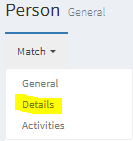
Identify the desired candidate and click on their name. In the upper left corner, change the screen from "General" to "Details"